
Matrix view
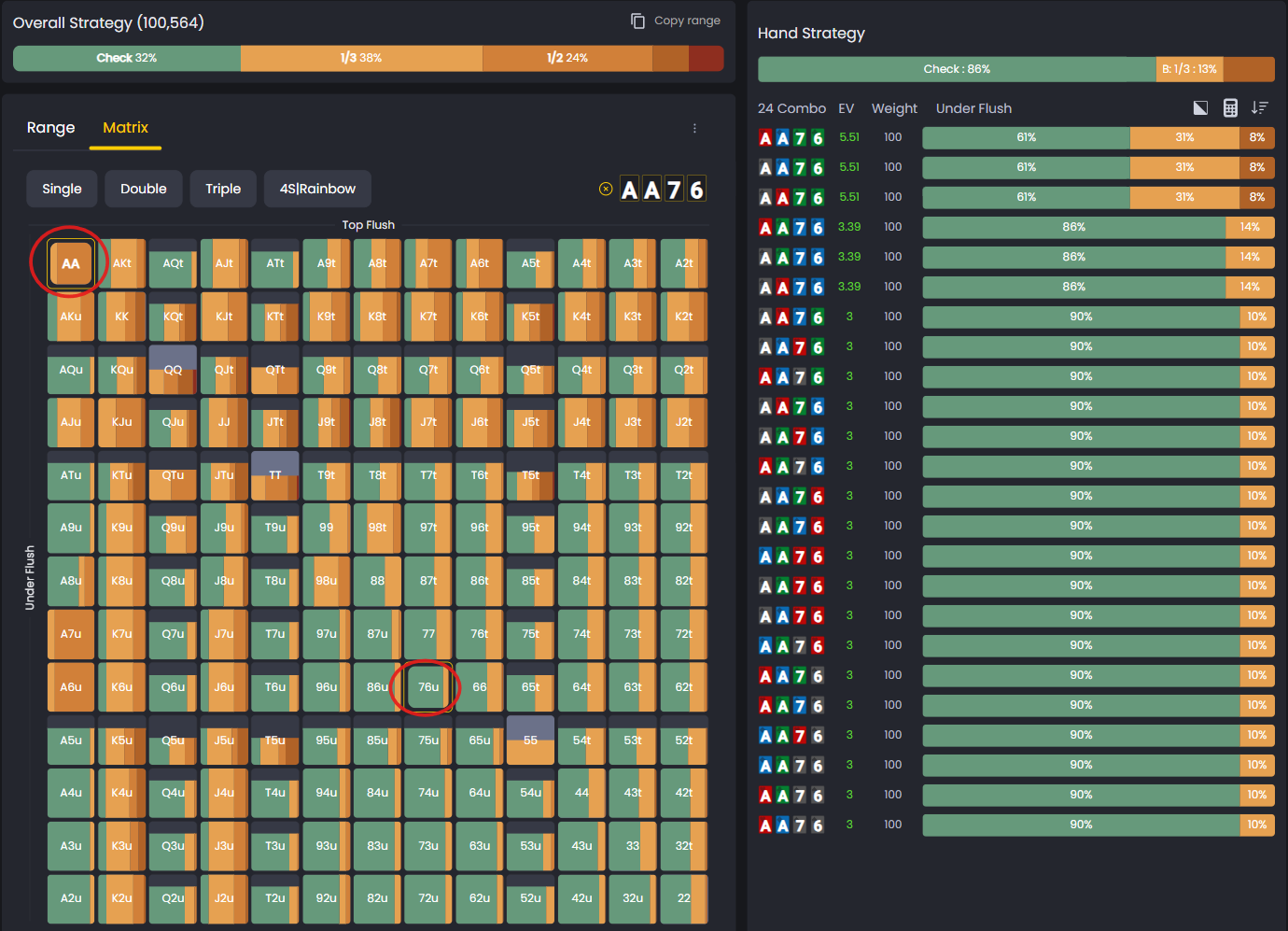
The Matrix View in the Strategies section lets you explore GTO strategy for your entire range in seconds. Pick your first two cards, then hover over the matrix to instantly see optimal play for any four-card combination. No clicks, no loading, just immediate strategy feedback.
While Range View is now your primary workspace, Matrix View remains essential for visual learners and quick range exploration.
How It Works
The Matrix View displays every possible starting hand in a familiar grid layout.
Once you choose your first two hole cards, hover over any cell to reveal the GTO-recommended action for that specific four-card combo.
This instant interaction lets you study dozens of combinations rapidly, spotting strategic patterns and understanding how your range plays across different boards.
You can set up specific study scenarios in the Game Configuration menu.
Switching Between Range and Matrix
You can switch between Range View and Matrix View anytime using the tabs at the top of the center panel. Range View is your default starting point, giving you the full strategic overview. Matrix View is there when you need visual exploration or want to memorize hand groupings.
Both views show the same underlying strategy, just presented differently. Use whichever one fits your current study goal.
Suit Tabs

The Matrix includes tabs labeled Single, Double, Triple, and 4s Rainbow, which show how the GTO strategy changes based on the suits in your own hand, not the board.
- Single means hands with one suit, also called single-suited.
- Double means hands with two suits, also called double-suited.
- Triple means hands with three cards of the same suit, also called triple-suited.
- 4s Rainbow means hands with all four suits different, also called rainbow.
Switch between these tabs to see how your hand’s suit structure affects optimal play. In PLO, suitedness has a major influence on preflop and postflop strategy, and these tabs make those differences easy to visualize.nd postflop strategy, and these tabs make those differences easy to visualize.
The Meaning of “t” and “u”
You’ll notice two suit-quality categories labeled t and u.
These indicate whether the suited combinations are top or under quality.
Top (t) refers to good suits:
- Single-suited: highest-ranked card is suited with another card.
- Double-suited: two highest cards are not suited together.
- Triple-suited: highest card is suited with another card.
- 4s / Rainbow: all four cards share the same suit.
Under (u) refers to weak suits:
- Single-suited: highest card is not part of the suit.
- Double-suited: top two cards are suited to each other.
- Triple-suited: highest card not suited with any other card.
- 4s / Rainbow: all four suits different.
Matrix vs. Other Views
Each view complements the others, helping you analyze the same strategy from different angles.
- Use Matrix View for quick exploration and intuitive range visualization. It’s the fastest way to understand overall range structure and hand clustering.
- Range View is best for sorting by EV or filtering by specific actions. It gives you precise numbers and frequencies for every combo.
- The Hand Categories panel groups hands by made-hand and draw categories. It’s useful for understanding how entire hand types play across the board.
Study Strategies
The Matrix View is ideal for memorizing ranges. You can see which hands belong to each action group and how they cluster together visually.
It’s also great for finding polarization. You can identify which hands bet for value versus bluff by looking at the color patterns across the grid.
The hover system lets you move through large data sets effortlessly. Regular study develops a visual understanding of balance, position effects, and board texture shifts.
To explore solver depth and coverage, review the article on Simulation Types. If you need to locate a specific hand or pattern quickly, use the Syntax Search tool directly within the Matrix.
Was this article helpful?
Still need help?
Join our community
Get instant support from experts and fellow players
Join Discord Community