
Replayer tips and shortcuts
The FlopHero Replayer is where you review hands and learn from your mistakes. But clicking through every action one by one gets old fast. If you want to study efficiently, you need to know the shortcuts and settings that let you move through hands quickly and focus on what matters.
This guide covers the keyboard shortcuts, navigation tips, and display settings that'll speed up your study sessions and help you get more out of every hand review.
Keyboard shortcuts you need to know
Forget clicking buttons. Here are the keyboard shortcuts that'll make you 10x faster:
- Right Arrow - Next action in the hand
- Left Arrow - Previous action in the hand
- Page Down - Next action from hero (skip opponent actions)
- Page Up - Previous action from hero
- Down Arrow - Next hand from list
- Up Arrow - Previous hand from list
The most important ones are Page Down and Page Up. These let you jump straight to your decisions without sitting through every villain check and call. When you're reviewing a session with 100+ hands, this saves serious time.
Navigation controls explained
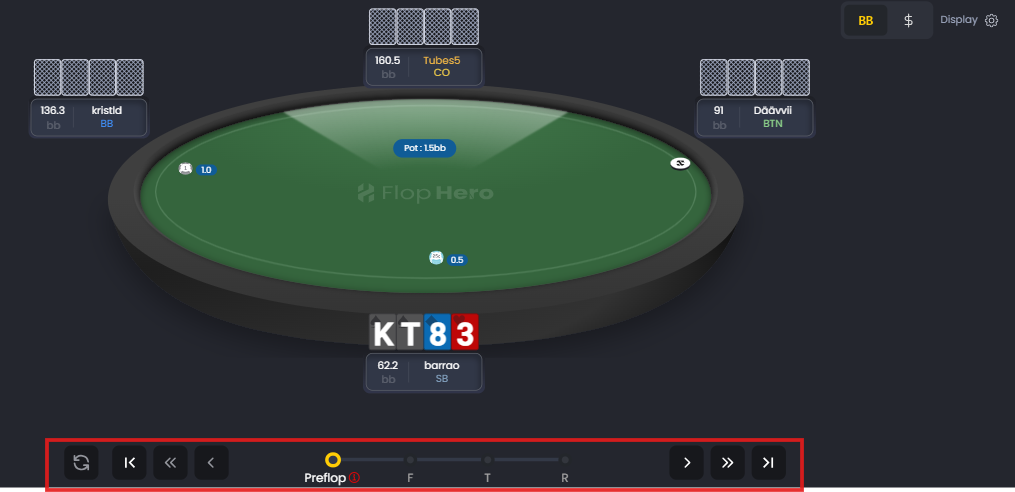
The bottom bar has all your navigation controls. From left to right:
- Refresh button (circular arrow) - Restart the hand from the beginning
- Previous hand (|<) - Jump to the previous hand in your list
- Previous hero action (<<) - Skip back to your last decision
- Step back (<) - Go to the previous action
- Street buttons (PF, F, T, R) - Jump directly to Preflop, Flop, Turn, or River
- Step forward (>) - Advance to the next action
- Next hero action (>>) - Skip ahead to your next decision
- Next hand (>|) - Jump to the next hand in your list
The street buttons are clutch when you want to focus on postflop play. Click F to jump straight to the flop action, or R to see how the hand played out on the river.
Display settings that matter
Click the Display button on the right side to open the settings panel. This is where you customize what you see.
Hero feedback
Toggle between EV and EV Loss %. EV shows the raw expected value in big blinds. EV Loss % shows how costly your mistake was relative to the pot size.
Use EV Loss % when you're prioritizing which mistakes to study. A 15% EV loss is a disaster you need to fix. A 1% deviation might not be worth your time.
Replayer settings
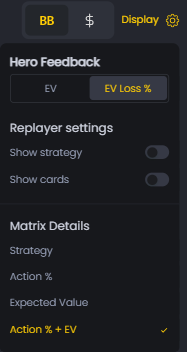
Show strategy - Toggle this to show or hide opponent strategies. Turn it off when you first review a hand so you can think through the spot yourself before seeing GTO's answer.
Show cards - Toggle this to show or hide opponent hole cards. Keep it off if you want to focus on ranges instead of results.
Matrix details
The Matrix Details section lets you switch between four different views:
- Strategy - Color-coded matrix showing GTO strategy (default view)
- Action % - Precise action frequencies as percentages
- Expected Value - EV for each action in the matrix
- Action % + EV - Both frequencies and EV shown together
Most of the time, Strategy view is what you want. But if you're drilling into specific combos, switch to Action % to see exact frequencies. See The Matrix View for more details.
Efficient study workflow
Here's how to use these shortcuts and settings in a real study session:
1. Start from the Handlist, sorted by GTO ΔEV (biggest mistakes first)
2. Open the first hand in the Replayer
3. Use Page Down to jump straight to your first decision
4. Turn off Show strategy and think through the spot yourself
5. Turn Show strategy back on and compare your thinking to GTO
6. If you made a mistake, use the street buttons to review the full hand
7. Press Down Arrow to move to the next hand
8. Repeat until you've reviewed all your big mistakes
This workflow lets you burn through hands fast while still thinking critically about each decision. No wasted time clicking through irrelevant actions.
Common mistakes to avoid
Don't review hands chronologically. Start with your biggest mistakes (highest ΔEV) and work down. Reviewing hands in the order you played them wastes time on spots that don't matter.
Don't leave Show strategy on the whole time. If you just passively watch GTO's answer, you're not learning. Force yourself to think through the spot first, then check your work.
Don't obsess over tiny deviations. If your EV Loss % is under 2.5%, you played the hand well enough. Move on to the blunders that are actually costing you money.
Next steps
Now that you know how to navigate the Replayer efficiently, learn how to interpret what you're seeing. Check out Understanding decision analysis to understand GTO frequencies and The Matrix View to learn how to read range strategies.
For a complete guide to using the Replayer interface, see Replayer interface guide.
Was this article helpful?
Still need help?
Join our community
Get instant support from experts and fellow players
Join Discord Community