
Handlist
The Handlist is one of the most powerful and frequently used tools in FlopHero. It's a detailed table that shows every single hand from a selected session or report, giving you an overall view of your play. By sorting and filtering this list, you can quickly pinpoint your most costly mistakes and identify recurring leaks in your strategy.
You can find the Handlist at the bottom of the Sessions and Reports pages. It dynamically updates based on your selections, acting as your command center for deep-dive analysis. Let's walk through how to get the most out of this essential feature.
Understanding the Handlist columns
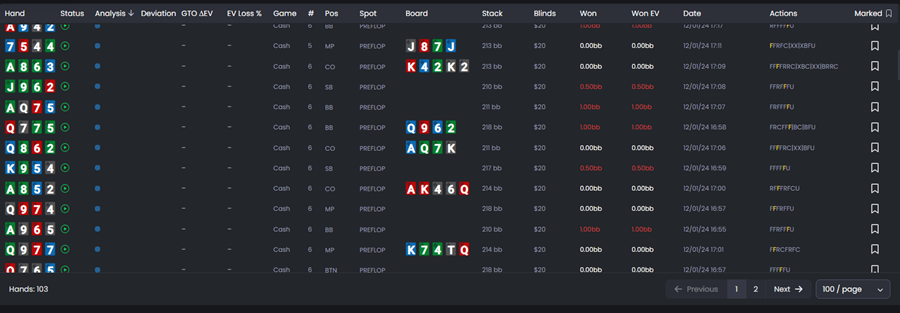
The Handlist is packed with data. Each row represents one hand, and each column gives you a different piece of information about that hand. Here are the key columns you'll see:
- Hand: Your hole cards, color-coded by suit.
- Status: Icons indicating whether the hand was analyzed by the GTO solver.
- Analysis: Shows the quality of your play. Green circles mean optimal or strong plays. Orange and red triangles signal weak plays and blunders.
- Deviation: In which specific street your play deviated from GTO recommendations.
- GTO ΔEV: The EV you lost compared to optimal play. This is the single most important metric for finding leaks.
- EV Loss %: Your EV loss as a percentage of the pot size.
- Game: The game type (usually Cash).
- # (Number): The number of players at the table.
- Pos: Your position at the table (BTN, CO, BB, etc.).
- Spot: The situation type (PREFLOP, B3P2P for 3-bet pot, LP3P for limped pot, etc.).
- Board: The community cards (if the hand went postflop).
- Stack: Your effective stack size in big blinds.
- Blinds: The blind level for the hand.
- Won: Your actual winnings for that hand in big blinds.
- Won EV: Your expected winnings based on all-in equity.
- Date: Timestamp of when the hand was played.
- Actions: Quick access buttons to review or bookmark the hand.
- Marked: Option to mark specific hands and save them for future analysis.
Sorting to find your biggest leaks
The real power of the Handlist comes from sorting. Click any column header to sort the table by that metric. To find your most expensive mistakes, click on the GTO ΔEV column header. This will sort your hands from highest to lowest EV loss.
The hands at the top of this sorted list are where you left the most money on the table. These should be your top priority in any study session. You can also sort by EV Loss % to find hands where you made proportionally large mistakes relative to the pot size.
Don't just focus on hands you lost. A perfectly played hand can still lose, and a poorly played hand can win through luck. The GTO ΔEV metric is your most reliable guide to decision quality, independent of short-term results.
Opening hands in the GTO Replayer
Once you've identified a hand you want to study, click anywhere on its row. This instantly opens the hand in the GTO Replayer, where you can see a full street-by-street breakdown of the action and compare your decisions to the solver's recommendations.
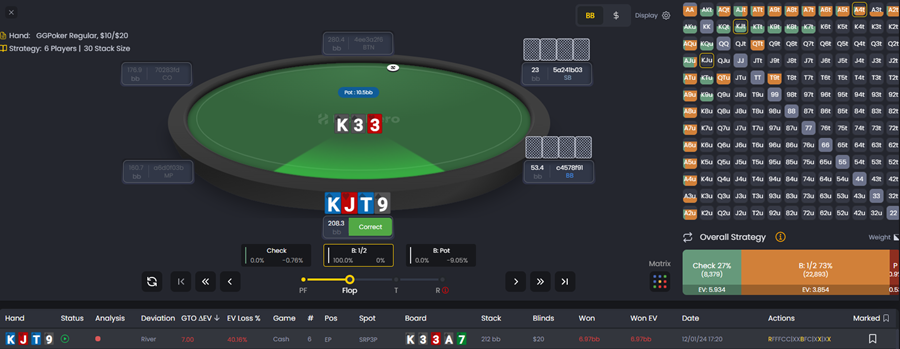
This seamless integration between the Handlist and the Replayer is the core of the FlopHero workflow. You can move from spotting a mistake to analyzing it in a single click, making your study process incredibly efficient.
Filtering for specific situations
While the Handlist on the Session Dashboard shows all hands from a selected session, you can create much more targeted views by using the Reports page. When you apply filters in a report (for example, showing only hands where you were in the big blind or only 3-bet pots), the Handlist updates to show only the hands that match your criteria.
This allows you to zero in on very specific situations to see if you're making recurring errors. For example, you could filter for hands where you faced a check-raise on the flop to see how you're handling that particular spot.
A practical study routine
Here's a simple but effective process for using the Handlist in your study routine:
- Go to the Session Dashboard and select a recent session to review.
- In the Handlist at the bottom, sort by the GTO ΔEV column to bring your biggest mistakes to the top.
- Open the top 3-5 hands in the GTO Replayer and analyze what went wrong. Pay close attention to the solver's recommended actions and sizings.
- Look for patterns. Are you making the same type of mistake repeatedly? For example, are you calling too often in out-of-position spots?
- Once you've identified a recurring leak, use the Reports page to create a filtered view of all the hands that fit that situation, and study them as a group.
This workflow turns raw data into actionable improvements. To keep your hand database organized, see Database Management. And if you want to understand why some hands don't get analyzed, check out Why We Don't Analyze Some Hands.
Was this article helpful?
Still need help?
Join our community
Get instant support from experts and fellow players
Join Discord Community