
Trainer - Feedback panel
The Feedback Panel is the core of your learning process in Trainer. After every preflop decision, it shows the GTO solution for that exact spot, including optimal frequencies, EV values, and how your action compares. It helps you understand what the best play is and how far off your choice was.
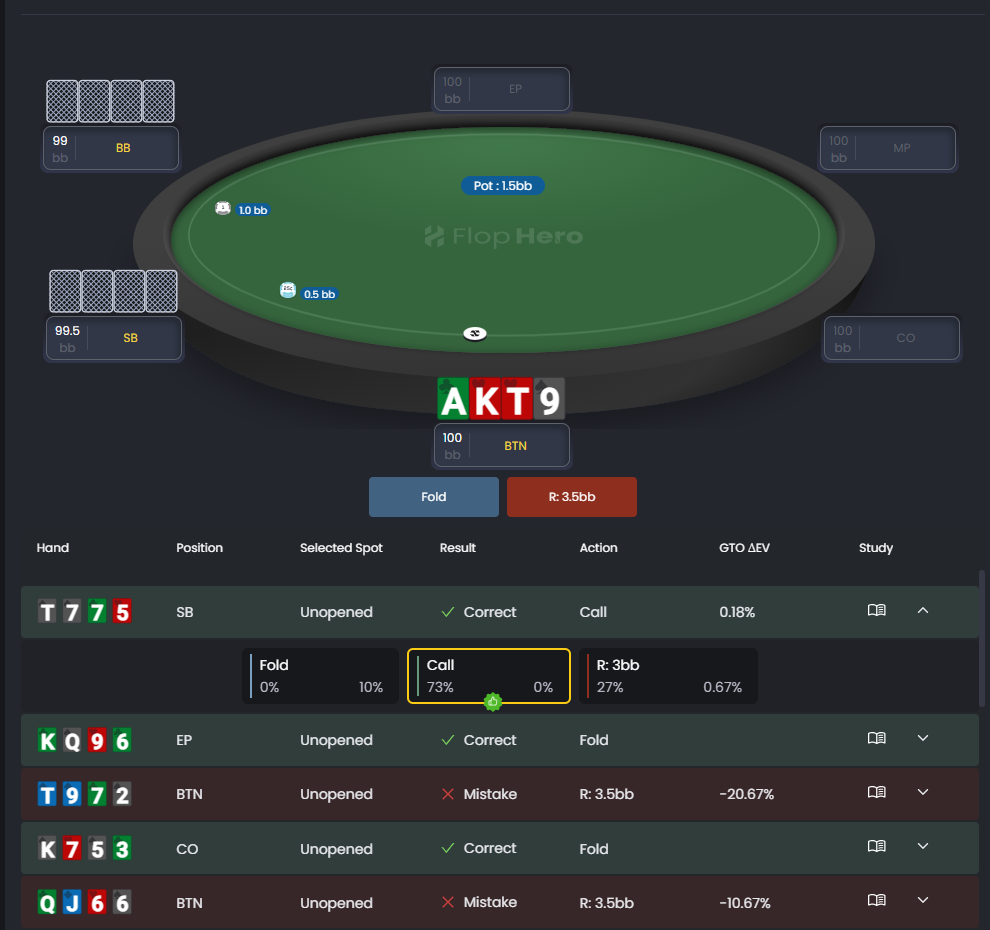
See how your decisions compare to GTO strategy and understand the EV impact of each action.
What the Feedback Panel Shows
After each hand, you’ll see:
- The optimal action frequencies (fold, call, raise)
- How often each action should be taken with your hand
- The EV (expected value) for every possible action
- How much EV you lost compared to GTO
Small EV losses mean minor mistakes. Large EV losses highlight where to focus your study.
Action Frequency Breakdown
GTO often mixes actions with the same hand. The Feedback Panel shows the exact percentages for each. Example: raise 70%, call 20%, fold 10%.
This mixed approach keeps your play balanced and unexploitable. You’ll also see how often your entire range takes each action, which helps you understand the overall strategy - not just the single hand.
EV Comparison
The panel displays the EV of all possible actions. This shows not only the best move but also how close or far the others are.
- Close EV example: call = 0.45 BB, raise = 0.47 BB. Either choice is fine.
- Large EV gap: fold = 0 BB, raise = 2 BB. That’s a major mistake.
Use these differences to rank your study priorities. Fixing the biggest EV leaks first will improve your game faster.
Study Button
The Study button, located on the right side of each result, lets you dive deeper into any specific spot. Clicking it opens the full Strategies section for that hand, showing:
- Complete range breakdowns for every position
- Action frequencies and EVs across all possible plays
- Board texture and equity information
- The full GTO solution with every detail you need
- Range vs Range comparission
This is your shortcut to detailed analysis without leaving Trainer. It’s ideal when you want to review why an action is preferred and explore alternative lines.
Use this feature whenever a spot confuses you or when EV gaps are large—it helps you understand the logic behind GTO decisions.

Use the Study button to explore detailed solver results and analyze alternative plays.
Identifying Patterns in Your Mistakes
As you train, look for recurring tendencies:
- Folding too much in certain positions
- Not 3-betting enough against late position opens
- Overcalling versus 4-bets
These leaks will become clear through consistent feedback. Once you spot a pattern, use the Study button to review those ranges in the Strategies section, then use Trainer filters to practice those situations until the correct play feels natural.
Using Feedback Effectively
Don’t skip through feedback. Take a moment to analyze why the GTO solution recommends a different play. Ask yourself:
- Why does GTO raise this combo more often here?
- When does calling make more EV than raising?
- How does position or stack depth change the mix?
The Feedback Panel gives you numbers. Your goal is to understand the reasoning behind them.
Focus on understanding big leaks first, not perfecting tiny differences.
Moving Forward with the Trainer
After reviewing your feedback, continue to the next scenario. Trainer presents a new situation, and you repeat the process: decide, review, learn.
It’s better to study ten hands carefully than rush through fifty without understanding them. The Feedback Panel is your main guide to mastering preflop play. Use it actively, think critically, and you’ll steadily improve your decision-making.
Was this article helpful?
Still need help?
Join our community
Get instant support from experts and fellow players
Join Discord Community