
Trainer - First steps
The Trainer helps you practice GTO preflop decisions through interactive poker scenarios. It gives instant feedback on your choices so you can internalize optimal preflop strategy faster than with passive study methods.
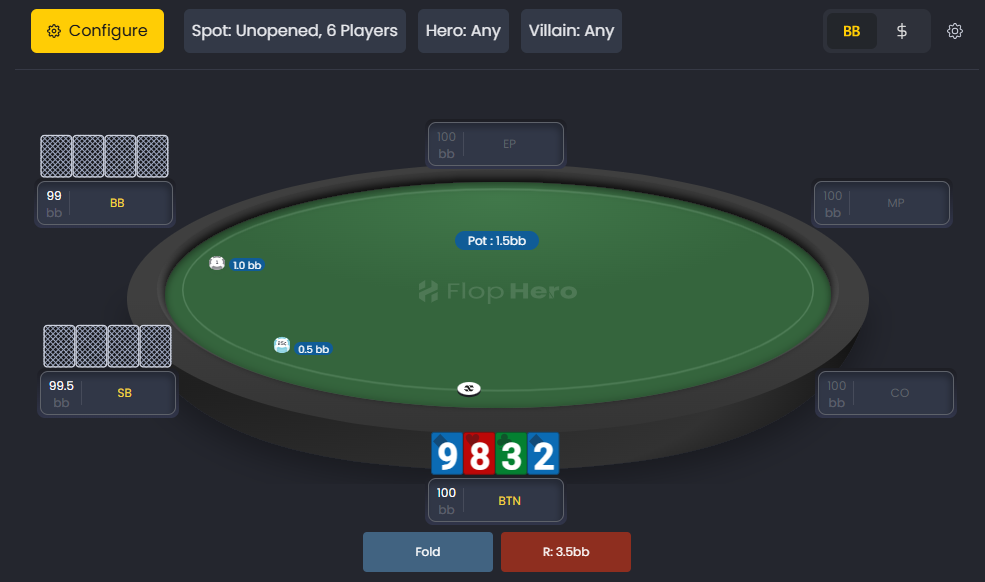
Practice GTO preflop spots with real poker scenarios and instant feedback on each decision.
What Is the Trainer
The Trainer presents preflop situations based on your selected settings. You’ll see your hand, the current action, and available options - fold, call, or raise. After you act, it immediately shows whether your choice matches GTO play.
This hands-on approach builds intuition and decision-making confidence for preflop spots. No more guessing. Yyou get instant feedback on every decision.
Current Availability
The Trainer currently supports Preflop simulations only. You can practice across multiple preflop situations, but postflop training isn’t available yet.
Postflop training is planned for future updates. In the meantime, mastering preflop play provides a strong strategic base that’ll pay off in every session.
Accessing the Trainer
You’ll find the Trainer in the main navigation bar of the FlopHero interface. Click Trainer to open the setup window.

Open the Trainer directly from the main navigation bar to start practicing preflop decisions.
Configuration Options
The Trainer FIlters defines the environment for your session. You can adjust:
- Poker Site
- Stake
- Blinds Structure
- Players
- Stack Size
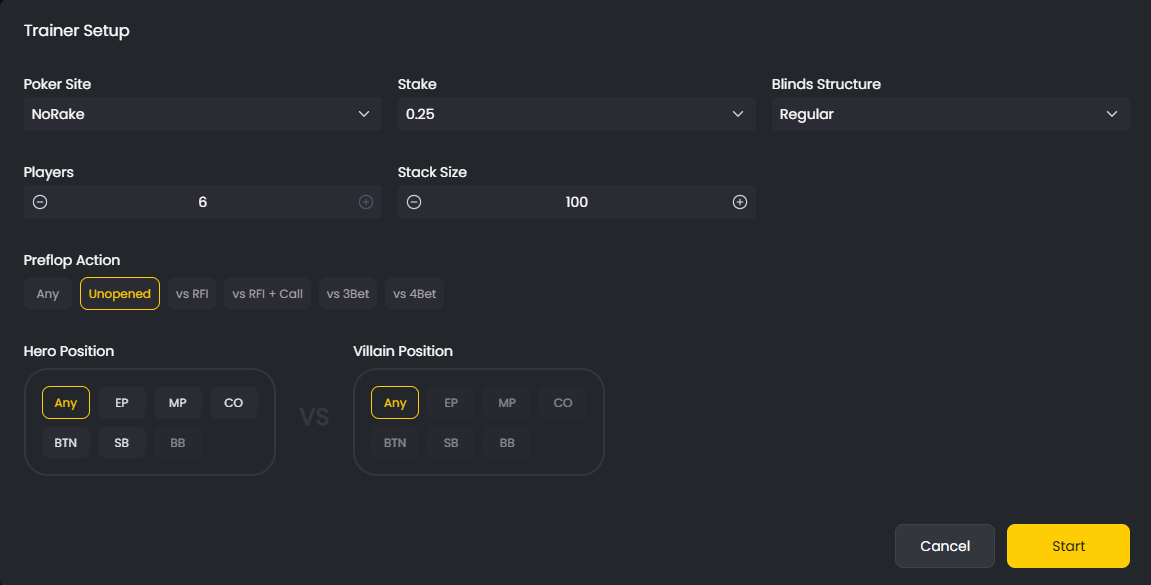
Set your preferred game conditions, such as stake size and number of players, before training.
Setting Up Your First Session
Choose your preflop action scenario:
- Any: All available situations
- Unopened: First to act (open-raising spots)
- vs RFI: Facing a raise
- vs RFI + Call: Facing a raise and a flat call
- vs 3Bet: Facing a re-raise
- vs 4Bet: Facing a 4-bet
Starting with Unopened helps you practice open-raising from each position - a key skill for building solid ranges.
Next, choose your Hero Position. You can select Any or specific seats such as Button, Cutoff, or Big Blind. Beginners often choose Any for broad exposure.
Optionally, you can also select a Villain Position to practice targeted matchups.
Starting your training
After configuration, click Start. The Trainer presents a preflop hand matching your chosen scenario. You’ll see your cards, position, and available actions.
Select your move, review the feedback, and proceed to the next spot. The Trainer will keep generating new situations until you stop or adjust settings.
Analyzing your session
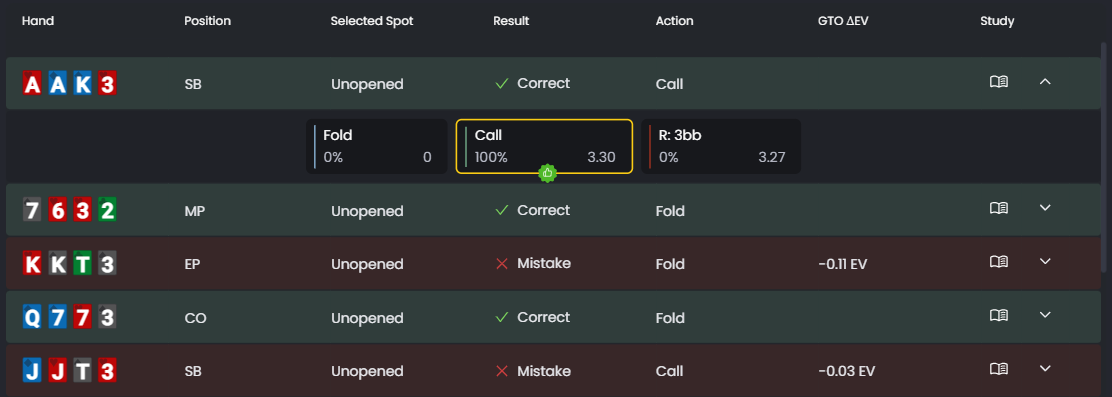
At the bottom of the screen, you’ll find a series of tabs that provide detailed statistics about your training session:
- Hand: The specific combo you played with
- Position: YOur position in the hand
- Selected Spot: Witch spot are you playing
- Result: A summary of your results, categorized Mistake or Correct
- Action: The action you decide to take on the given scenario
- GTO ΔEV: Your GTO ΔEV deviation on that spot
Study: Click the Study button on any hand to open the full Strategies section, where you can analyze the complete range and explore every detail of that specific spot.
The Study button is your shortcut to deep analysis. When you click it, you’ll jump straight to the Strategies section with that exact scenario loaded. There, you can review the entire range, see how different hands should play, and understand the logic behind GTO decisions.
Tips for getting started
- Start simple: Begin with unopened pots from all positions before tackling 3-bet or 4-bet scenarios
- Learn from mistakes: Review the feedback to understand why the solver prefers a different move
- Stay consistent: Short, focused 15-20 minute sessions yield better results than long, distracted ones
- Consistent use of the Trainer strengthens your preflop decision-making and speeds up skill development.
Was this article helpful?
Still need help?
Join our community
Get instant support from experts and fellow players
Join Discord Community