
Range tab
The Range Tab is now your primary workspace in the Strategies section. It shows which hands GTO plays from every position and how each one performs. Learning to read this view improves both preflop and postflop decisions by revealing not just which hands appear in a range but how often they take each action.
Range View opens by default when you analyze any spot. This gives you an immediate overview of the entire strategy before you zoom into specific hands.
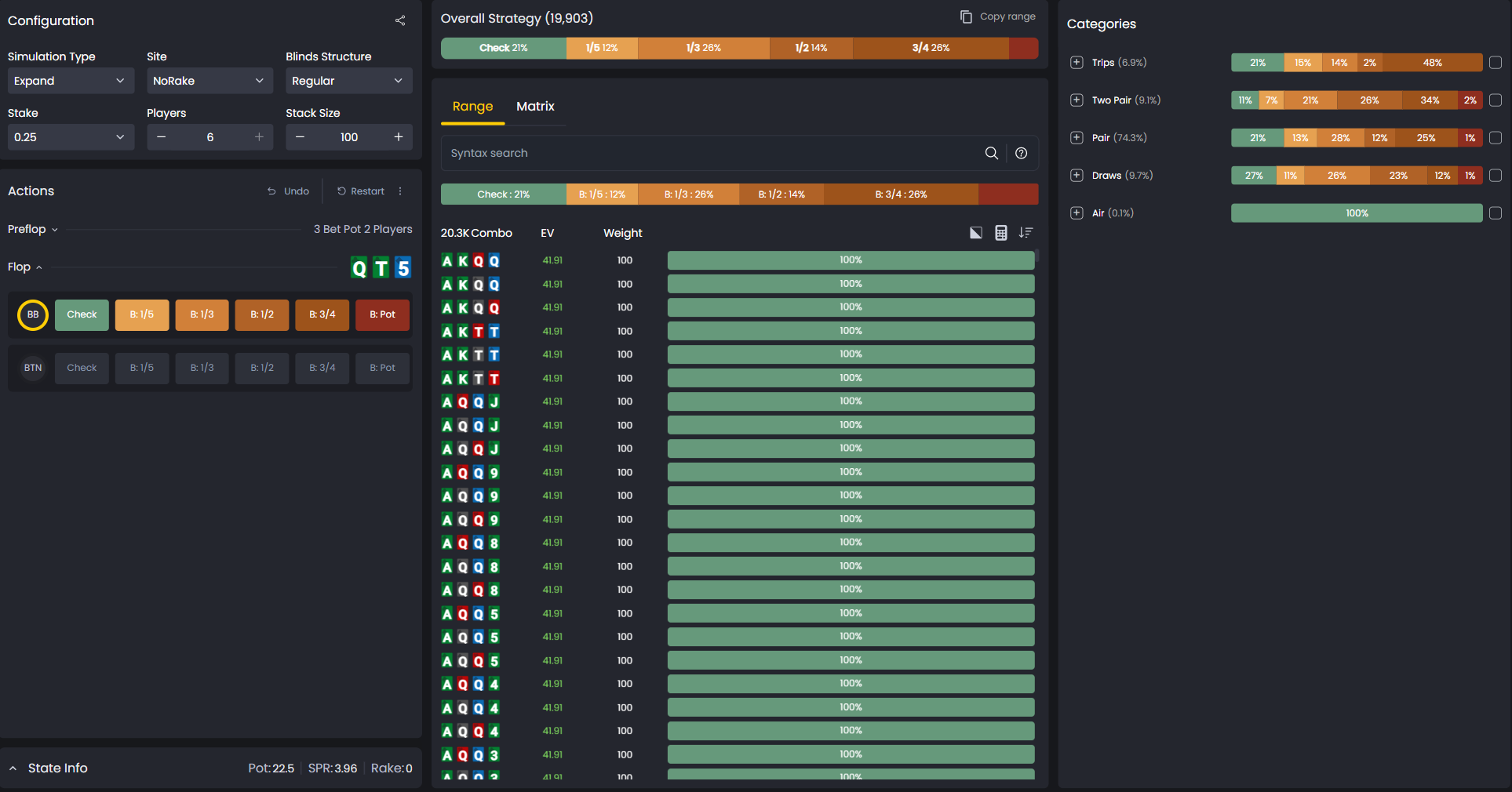
What You’re Looking At
The Range Tab displays every player’s range at a given decision point, along with action frequencies for each hand. For every combination, you’ll see the GTO percentages for folding, checking, betting, or raising.
Some hands play pure strategies, always betting or always checking. Others use mixed strategies, such as betting 60% and checking 40%. This gives you a complete picture of how balanced ranges operate across positions.
The tab shows each combo with its cards, EV in green, weight (how often it appears in the range), and action bars. Orange bars typically represent aggressive actions like raises, while green bars show passive actions like checks or calls.
Filter and Sort Tools
Use the Range Tab filters to study specific parts of a strategy. The EV column sorts by Expected Value to see which hands generate the most profit. The Weight column shows how often each hand appears within the range.
You can filter by action to isolate Fold, Call, or Raise categories and see their frequencies. The Flush filter highlights flush draws and completed flushes for board texture analysis.
These options help you explore GTO strategies from multiple perspectives. You can also use the Syntax Search tool to locate specific holdings instantly. – Highlights flush draws and completed flushes for board texture analysis.
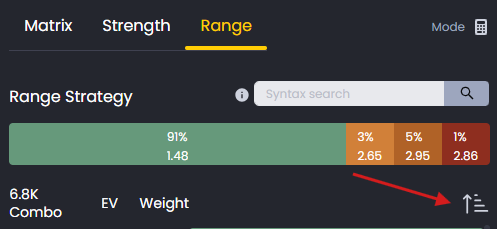
Use filters to isolate actions like Fold, Call, Raise, or highlight flush draws for deeper analysis.
How Ranges Are Built
The Range Tab reveals the structure behind GTO construction. You’ll see how position, stack depth, and board texture affect range composition. These variables are set in the Game Configuration menu.
You’ll recognize consistent patterns such as polarized betting and balanced bluffing across similar situations.
Understanding these patterns helps you see the logic behind solver decisions. Instead of memorizing individual hands, you’ll learn the principles that guide range construction.
Finding Your Leaks
The Range Tab highlights where your play diverges from GTO. Folding hands that belong in your range means you’re playing too tight. Calling or betting with hands GTO folds means you’re too loose.
Overusing an action, such as betting 100% instead of 70%, makes your play predictable. By comparing your action frequencies with solver outputs, you can pinpoint exactly which parts of your range need adjustment.
This is where the GTO Tracker becomes powerful. It shows you where you deviated, and the Range Tab shows you what the correct play should have been.
Using Range View with Hand Categories
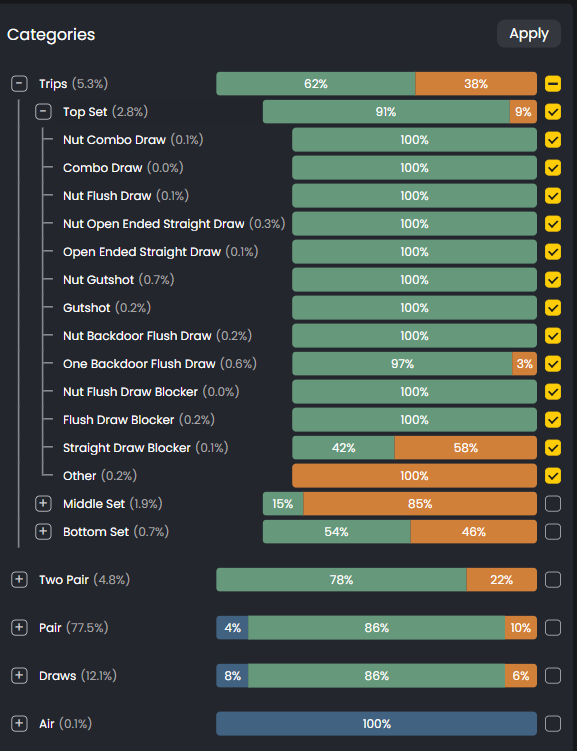
In postflop spots, the Hand Categories panel on the right side helps you filter and compare different hand types. You can isolate pairs, trips, straights, flush draws, and more to see how each category plays across the board.
This makes it easier to understand the logic behind GTO’s decisions. Instead of studying hundreds of individual combos, you can see how entire categories behave and apply those patterns to your game.
Related Tools
If you prefer a visual view of the same data, explore Matrix View. It shows GTO strategies as color-coded hand grids, making it easy to see which hands cluster together in each action category.
The Matrix is especially useful for memorizing ranges and building intuition. Range View is better for sorting by EV, filtering by action, and understanding the exact frequencies behind each decision.
Use both views together to get a complete picture of any spot.
Was this article helpful?
Still need help?
Join our community
Get instant support from experts and fellow players
Join Discord Community